Airtable Embeds Do Not Show the Toolbar on Mobile
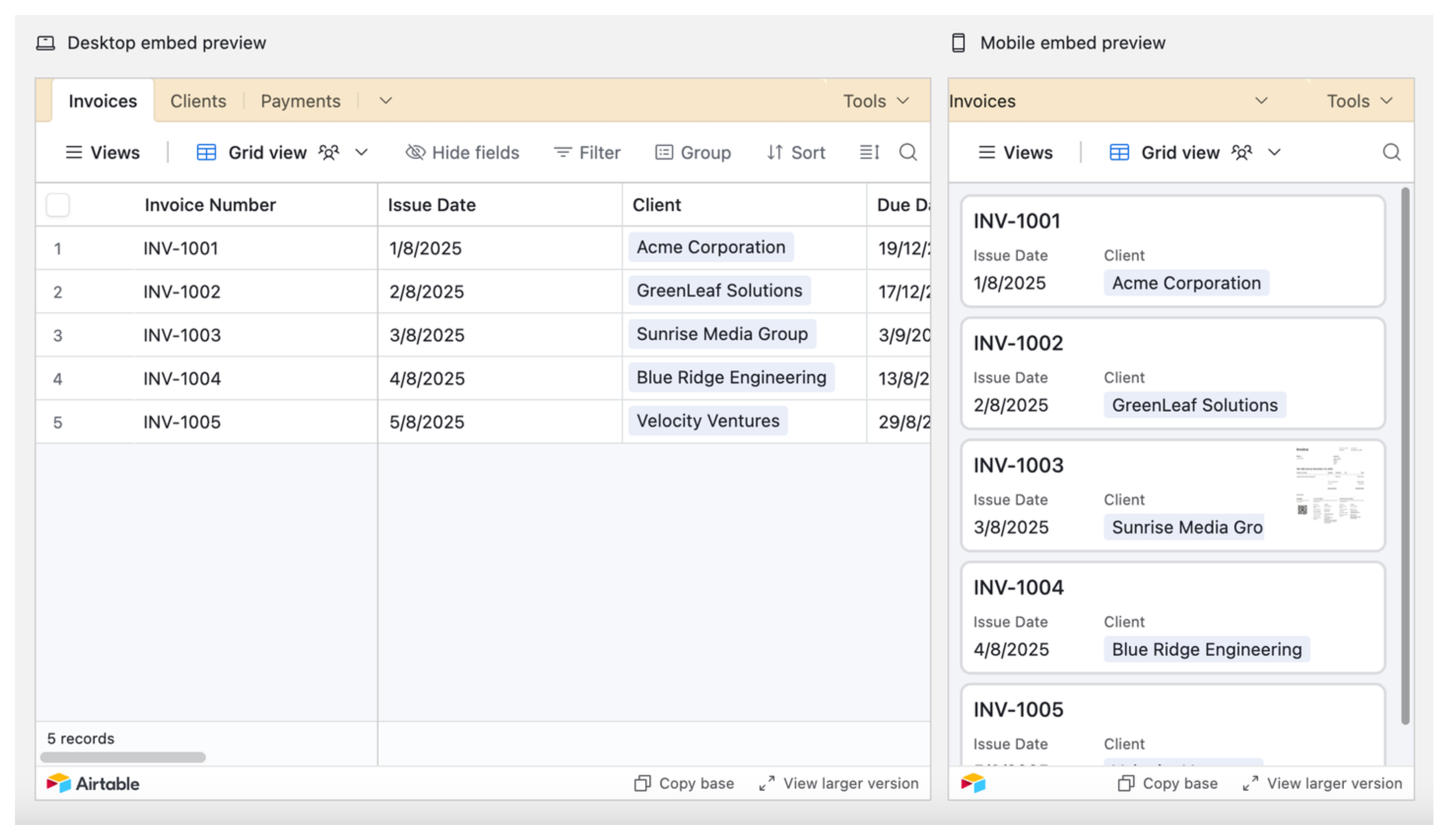
When you embed an Airtable view as an iframe on a website, desktop users see a toolbar with filter, search, sort, and view switcher controls. Mobile users get none of that. The toolbar is hidden and there is no supported way to bring it back within a standard embedded view.
Airtable has never officially documented this as intentional. It is a longstanding limitation with no native fix. If you are running into other iframe limitations, Airtable iframes also do not show real-time updates by default, which is a separate but related problem worth knowing about.
What Mobile Users See
On mobile, an embedded Airtable view shows record data in a simplified card or list format. Record names are tappable and expand to show field details. That is the extent of the interaction. There is no filtering, sorting, searching, or view switching.
Your Options
Option 1: Pre-Configure the View Before Embedding
This does not restore the toolbar, but it reduces the need for one. Instead of embedding a general-purpose view and expecting users to filter it themselves, set it up the way you want it before generating the embed link.
Create a dedicated view in your base with the right filters, sort order, and visible fields already applied. Share that view and embed it. Mobile users land on a pre-focused dataset that does not require any interaction to be useful.
If different audiences need different cuts of the data, create a separate shared view for each and embed the right one in each context.
One thing to keep in mind: Airtable does not support filters that reference hidden fields in embedded public views. Any filter conditions need to reference fields that are visible in the view. For a full walkthrough of embedding views and the options available when generating the embed code, see 5 Ways to Display Airtable Data on Your WordPress Site.
Option 2: Use a Purpose-Built Portal Tool
If mobile usability is a genuine requirement, embedding an Airtable view directly is the wrong tool for the job. A purpose-built portal gives you full control over the mobile experience.
Softr and Noloco both connect directly to your Airtable base and generate mobile-responsive web apps where search, filtering, and record detail views all work properly on small screens. These are standalone apps with their own URL rather than iframes embedded in another site.
This is the option I recommend when the people using the content are primarily on phones and the native Airtable embed is too limited to serve them.