Designing Event Based Relationships in Airtable
You want to model real world relationships in Airtable.
People attend events. Events create relationships. Those relationships have meaning that can change depending on direction.
For example, Charles and Amy both participate in an event called the marriage of Charles and Amy. As a result of that event, a relationship is formed. Charles becomes the spouse of Amy, and Amy becomes the spouse of Charles.
The same pattern applies to many other scenarios. A birth event creates a parent and child relationship. An adoption event creates a different kind of parent and child relationship. A graduation event might create a mentor and student relationship.
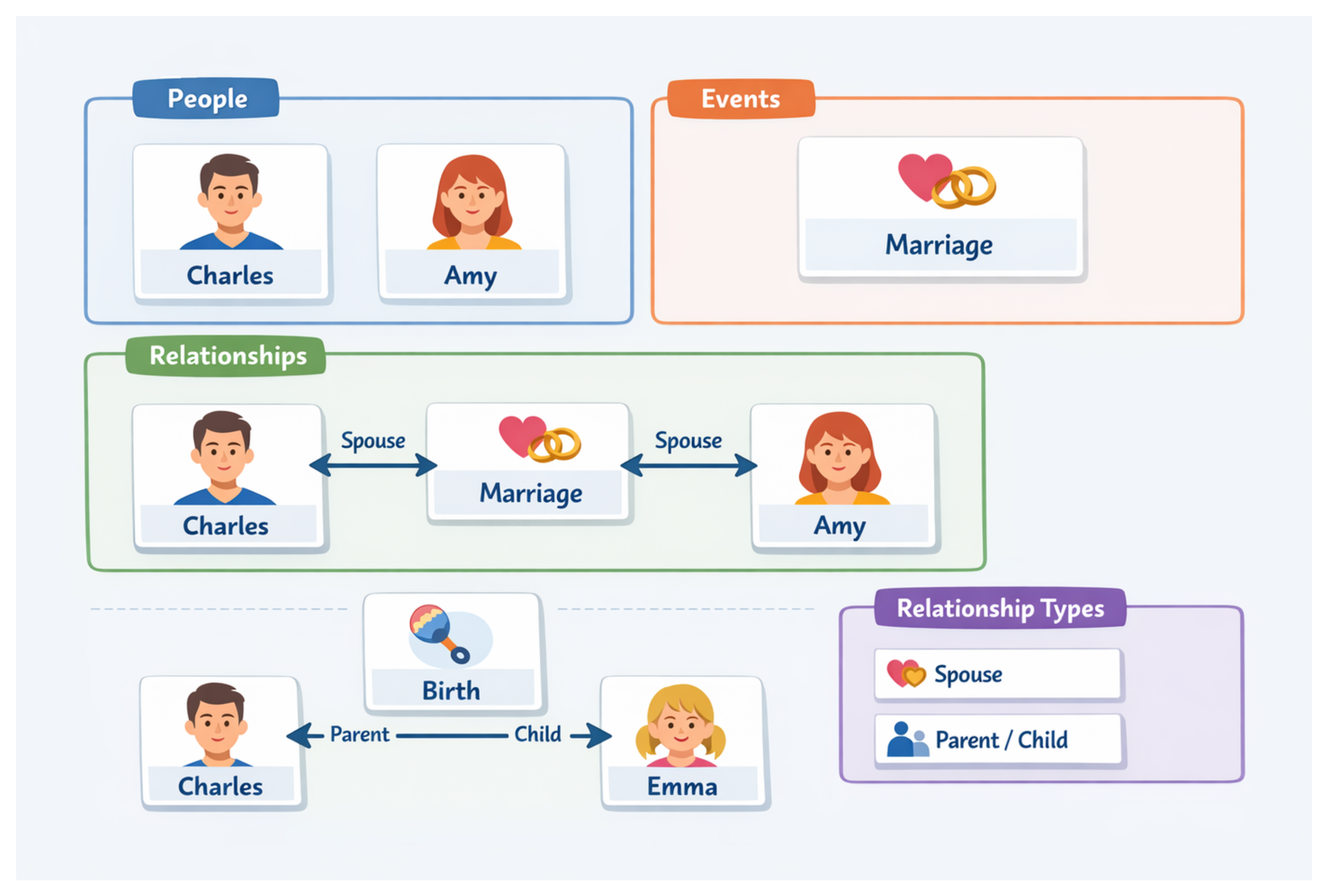
Trying to store all of this directly inside a single People table quickly becomes difficult to manage. You end up with duplicated fields, rigid structures, and logic that is hard to extend.
A relational design solves this cleanly.
Start with a People table
The foundation of the base is a People table.
This table contains one record per person. You store all person specific information here such as name, date of birth, contact details, or any other attributes you care about.
Importantly, this table does not try to store relationships directly. It only represents people as individual entities.
This keeps the table simple and stable even as your model grows.
Create an Events table
Next, create an Events table.
Each record represents a real world event such as a marriage, a birth, an adoption, or any other moment that connects people.
This table links to the People table using a linked record field called Participants or something similar. An event can be linked to multiple people, and each person can be linked to multiple events.
This creates a clean many to many connection between people and events.
At this stage, you know who participated in what, but you have not yet defined what those connections mean.
Add a Relationships table
The meaning comes from a dedicated Relationships table.
Each record in this table represents a single directional relationship between two people.
You create two linked record fields that both link back to the People table. One field represents the From person. The other represents the To person.
You also add a linked record field that connects the relationship back to the event that created it.
For example, a marriage event would create two relationship records. One from Charles to Amy, and one from Amy to Charles. Both records link back to the same marriage event.
This structure allows you to model direction explicitly instead of trying to infer it later.
Create a Relationship Types table.
Each record in this table defines a type of relationship. For example spouse, parent, child, mentor, or student.
This table includes two key fields. One describes the From to To label, such as parent of. The other describes the reverse To to From label, such as child of.
When you create a relationship record, you link it to a relationship type. The type determines how the relationship should be interpreted in each direction.
For a marriage, both directions may be spouse of. For a birth event, one direction is parent of and the other is child of.
Why this structure works well
This design separates concerns cleanly.
People are stored once as independent records. Events provide the context and timing that connect people together. Relationships define the meaning and direction of those connections. Relationship types keeps the naming consistent across the entire base.
Because everything is normalized, adding new relationship types or event types does not require changing existing tables or fields. You simply add new records.
This approach also scales well. You can filter relationships by event, by person, or by relationship type. You can build interfaces that show family trees, timelines, or networks without restructuring your base.