You are using Airtable's Search extension to quickly find records in your base.
Searching works fine. You type something in, find the record you need, and click it.
But when the record opens, the fields are not in the order you expected.
Maybe you already have a Grid view where the important fields are at the top and unnecessary fields are hidden. But the record opened from Search does not follow that setup.
The reason is that the Search extension is getting the field order from a different view.
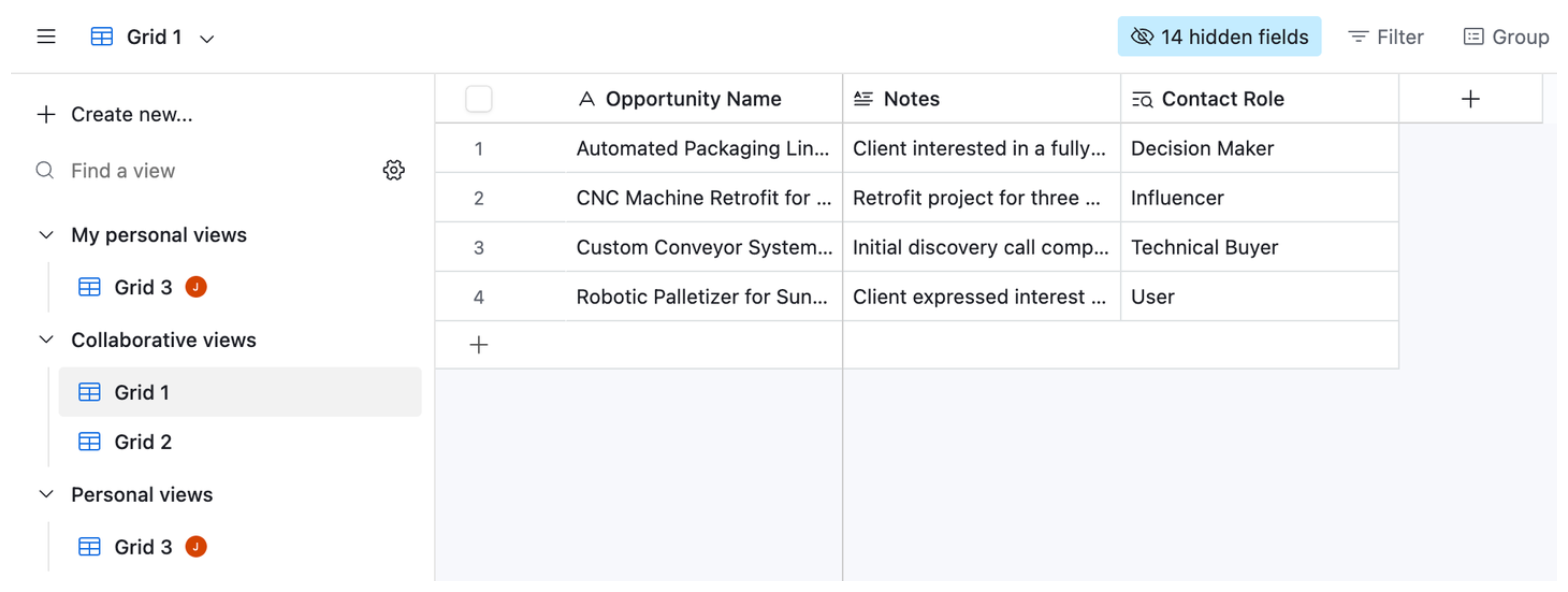
Airtable uses the first collaborative Grid view
When you open a record from the Search extension, Airtable uses the field order from the first collaborative Grid view in that table.
It does not necessarily use the Grid view you normally work from.
For example, imagine your table has these views:
All Records
My Working View
Completed Records
If All Records is the first collaborative Grid view, its field order is what Airtable uses when you open a record from Search.
That is why changing the field order in your normal working view might not change what you see.
Change the first collaborative Grid view
Go to the table you are searching and find the first collaborative Grid view.
Then arrange its fields in the order you want them to appear when you open a record from Search.
For example:
Name
Company
Status
Notes
You can also hide fields you do not need.
Once you have changed the view, go back to the Search extension and open a record again.
You should now see the fields in the order you set in that first collaborative Grid view.
Keep your normal working view separate
You do not have to turn this into the Grid view you use every day.
If you already have another view set up exactly how you like for normal work, keep using it.
Just remember that when you want to change how a record opens from the Search extension, the view you need to change is the first collaborative Grid view.
It is a small Airtable behavior that is easy to miss because there is no setting inside the Search extension itself for choosing the field order.