Why You Cannot Restrict Sensitive Data Inside an Airtable Base (And What to Do Instead)
This is one of the most common misconceptions about Airtable: the idea that you can give someone base access but hide specific records, tables, or fields from them using permissions.
You cannot.
If someone has access to a base, they have access to the data in that base. Airtable does not have row level security, column level visibility restrictions, or per user data filtering at the base level. The closest thing it has is field editing permissions, which control who can change a field, not who can see it.
Understanding exactly why this is, and what actually works instead, will save you a lot of time configuring something that will not do what you expect.
What Airtable Permissions Actually Control
Airtable's permission system controls what actions collaborators can take, not what data they can see.
-
Owner/Creator - can make structural changes, manage collaborators, run automations
-
Editor - can add, edit, and delete records
-
Commenter - can view records and leave comments
-
Read-only - can view records only
Notice that all four of these roles say "view records." Even the most restricted role has visibility into all records and fields in any table they have access to.
Field editing permissions on Airtable Business and Enterprise plans add another layer. You can restrict who can edit specific fields. But again, this is edit control, not visibility control. A person with read only field permissions can still see the value in that field.
There is simply no setting inside a base that hides specific data from specific people.
Why Airtable Works This Way
Airtable is fundamentally a relational database with a collaborative UI. It was designed around the idea that everyone working in a base shares a view of the same data. The permission model was built to control who can change things, not who can see things.
Row level security, where different users see different subsets of the same table based on rules, is a feature of enterprise databases and some advanced tools. Airtable does not support it at the base level, and as of 2026 there is no indication this is changing.
The closest you can get inside a base is using personal views with filters, but personal views are per person and private by default. You cannot force a collaborator to stay in a specific view. They can always switch to a different view that shows all records.
What Actually Works: Three Approaches
Approach 1: Interface-Only Access (Best for Most Cases)
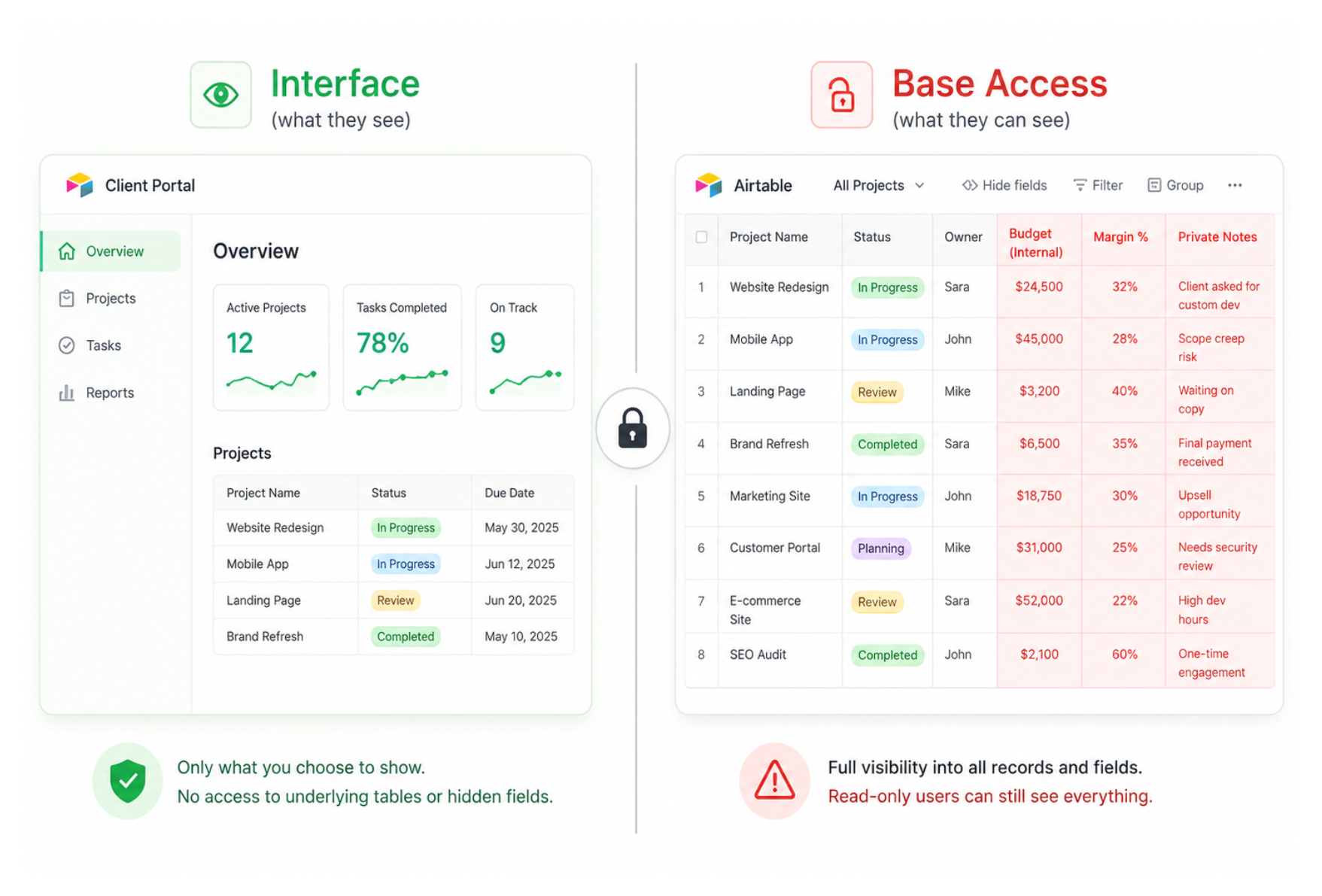
The most practical solution for most teams is to remove base access entirely and give users Interface-only access.
An Interface sits on top of the base and shows only what you choose to expose. An Interface-only user cannot see the underlying tables, cannot navigate to raw data, and cannot access fields you have not included in the Interface layout.
This means you can build a reporting Interface that shows high-level metrics and aggregate numbers, without exposing the individual case records, salary figures, or raw data behind them.
How to set this up:
-
Build your Interface in the Interface editor - include only the tables, fields, and records you want this person to see
-
In the base, click Share and remove the person's base-level access if they currently have it
-
In the Interface editor, click Share and invite the person directly from here
-
They receive an invitation to the Interface only and cannot access the base
The key step is removing base access. If someone still has base access, the Interface restriction does not help because they can simply open the base directly.
What this works well for:
-
Managers who need to see progress reports but not individual case records
-
Executives who need high-level dashboards without access to operational data
-
New team members who should see current work but not historical records
-
Clients who need to see their project status but not your internal notes or margins
For more on how to structure interface access, see How to Restrict a New Collaborator's Access to Historical Records and Sensitive Fields in Airtable.
Approach 2: Separate the Sensitive Data Into a Different Base
If you have data that is so sensitive it should not be in the same base as the rest of your team's work, put it in a different base entirely.
The typical setup:
-
Shared base - contains the operational data everyone works with. No salary fields, no margin data, no confidential notes.
-
Restricted base - contains the sensitive data. Access limited to a small group (HR, Finance, Leadership).
You can sync relevant non-sensitive fields from the shared base into the restricted base using Airtable Sync, so the restricted team has full context. But the sensitive data never appears in the shared base, and therefore can never be seen by people who only have access to the shared base.
This is genuinely more secure than Interface-only access because the data physically does not exist in the same location. Even if someone finds a way to bypass the Interface (developer tools, API calls), the sensitive data is not there to find.
The tradeoff is operational complexity. Maintaining two synced bases requires more thought about which data lives where, and edits need to happen in the right place.
For guidance on setting up Airtable Sync between bases, see How to Copy Data From One Airtable Base to Another.
Approach 3: External Portal Tools
If your use case is giving external clients or stakeholders access to a subset of your data, a dedicated portal tool is often cleaner than trying to configure Airtable's native sharing.
Tools like Softr and Noloco connect to your Airtable base and build a separate frontend. Users log in to the portal and see only what you have configured, with no path to the underlying Airtable base. Access is governed by user-level permissions in the portal, which you control fully.
These tools also support row level filtering per user, something Airtable cannot do natively at the base level. Each logged in user only sees their own records.
The Common Mistake to Avoid
A lot of people try to solve this by using views. They set up a view that hides certain fields or filters to certain records, then share that view link with the person they want to restrict.
This does not work for security. Shared view links restrict the initial experience, but if the person has base access, they can navigate away from the shared view to any other view in the base. You have not restricted their access. You have only given them a starting point.
Views are for organising and presenting data, not for security. The only reliable way to restrict what someone can see is to control their access level at the base or interface level.
Quick Decision Guide
| Situation | Solution |
|---|---|
| Team member needs reports, not raw data | Interface-only access |
| Need to hide salary/margin from most of the team | Separate restricted base |
| External client needs to see their own records only | Portal tool (Softr, Noloco) or Airtable Portals |
| Need to prevent editing a specific field | Field editing permissions (Business/Enterprise) |
| Want to hide a field from view | Not possible at base level - use Interface |
For a broader look at access management across your base, see Best Practices for Sharing Complex Airtable Bases Securely.