When building integrations on top of Airtable, knowing what counts toward your API limits and what falls outside them is important for designing workflows that stay reliable and avoid unexpected 429 errors.
Airtable enforces separate API limits that affect how integrations interact with your bases. These include both rate limits and monthly call quotas. Both are covered below, along with a clear breakdown of which activities count against them and which do not.
The Limits You Need to Know
Per-second rate limit
Airtable enforces a limit of 5 API requests per second per base. This applies to all external API calls made to api.airtable.com. Exceeding it returns a 429 Too Many Requests error and the excess requests are dropped until the rate subsides.
This limit is the same on every plan and cannot be increased. It is scoped per base, not per account.
In addition, Airtable enforces a limit of 50 requests per second across all traffic authenticated using the same Personal Access Token (PAT) owner. Most users will encounter the per-base limit first, but high-volume integrations spanning multiple bases may also be constrained by the PAT limit.
Monthly API call quota
Every Airtable workspace has a monthly API call quota that resets each billing cycle. The quota varies by plan:
| Plan | API calls per month |
|---|---|
| Free | 1,000 |
| Team | 100,000 |
| Business | Unlimited |
| Enterprise Scale | Unlimited |
If a workspace exceeds its monthly quota, Airtable may begin throttling API access or returning 429 errors until the next billing cycle. If you are on the Free or Team plan and seeing persistent 429 errors rather than short bursts, a depleted monthly quota is one possible cause. Check your workspace billing settings before assuming the problem is request pacing.
For a full explanation of both 429 triggers and how to fix them, see why you are getting Airtable error 429 and how to fix it.
What Counts Against Your API Limits
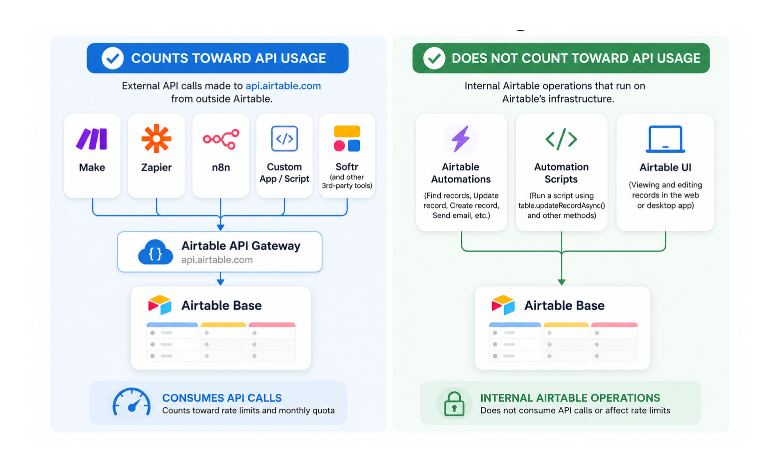
External API calls made to api.airtable.com from outside Airtable count against both the per-second rate limit and your monthly quota. This includes:
- Calls from Make, Zapier, or n8n scenarios
- Calls from your own scripts or applications using the Airtable REST API
- Calls from third-party tools like Fillout, Softr, or any other Airtable-connected app
Multiple tools querying the same base simultaneously share the same per-second rate limit. If Make is running a scenario against your base at the same time your own script is running and Softr is serving a portal user, all three count toward the same 5 requests per second cap on that base.
What Does Not Count Against Your API Limits
Airtable automations: Actions inside native Airtable automations (Find records, Update record, Create record, Send email, and so on) do not consume your external API quota. They run on Airtable's internal infrastructure and are not subject to the 5 requests per second rate limit.
Scripts inside automations: When a Run a script action inside an Airtable automation uses table.updateRecordAsync() or other base object methods, those calls also use internal infrastructure rather than the external REST API. They are not rate-limited in the same way.
Viewing and editing records in the Airtable UI: Using Airtable's web or desktop application does not generate API calls against your quota or rate limit. The UI uses internal data channels.
Which API Features Are Available on Each Plan
The standard REST API for CRUD operations (create, read, update, delete) is available on all plans, including Free. The monthly quota above is what differs.
Some advanced API capabilities may vary by plan and Airtable occasionally changes feature availability. If you plan to use features such as the Metadata API, Webhooks API, or SCIM provisioning, check Airtable's current documentation to confirm availability for your workspace plan.
How to Check Your API Usage
Airtable provides limited API usage visibility in workspace settings, but it does not currently offer detailed historical analytics broken down by base, integration, or endpoint.
The practical way to monitor usage is at the source. In Make, check the number of operations used per scenario. In Zapier, check task history. In your own scripts, add logging for each API call made.
Practical Advice for Staying Within Limits
If you are building an integration that processes large numbers of records regularly:
- Batch all writes to use the maximum of 10 records per call. Ten updates sent as one batch request count as one API call against your monthly quota, not ten.
- Run Make or Zapier scenarios on a schedule rather than triggering per record, to avoid bursts of simultaneous calls.
- Use Airtable automations for record-level triggers where possible, since they do not consume external API quota.
- If you are regularly hitting the monthly limit on the Free plan, the Team plan is a significant step up. If you are on Team and still running out, the Business plan removes the monthly limit entirely.
- For very high volumes, contact Airtable about Enterprise Scale, which may offer different rate limit arrangements.