How to Auto-Generate Invoice Numbers in Airtable
Airtable's Autonumber field creates sequential numbers, but it cannot format them as invoice codes like INV-2025-0042 by itself. Here's how to generate professional invoice numbers automatically.
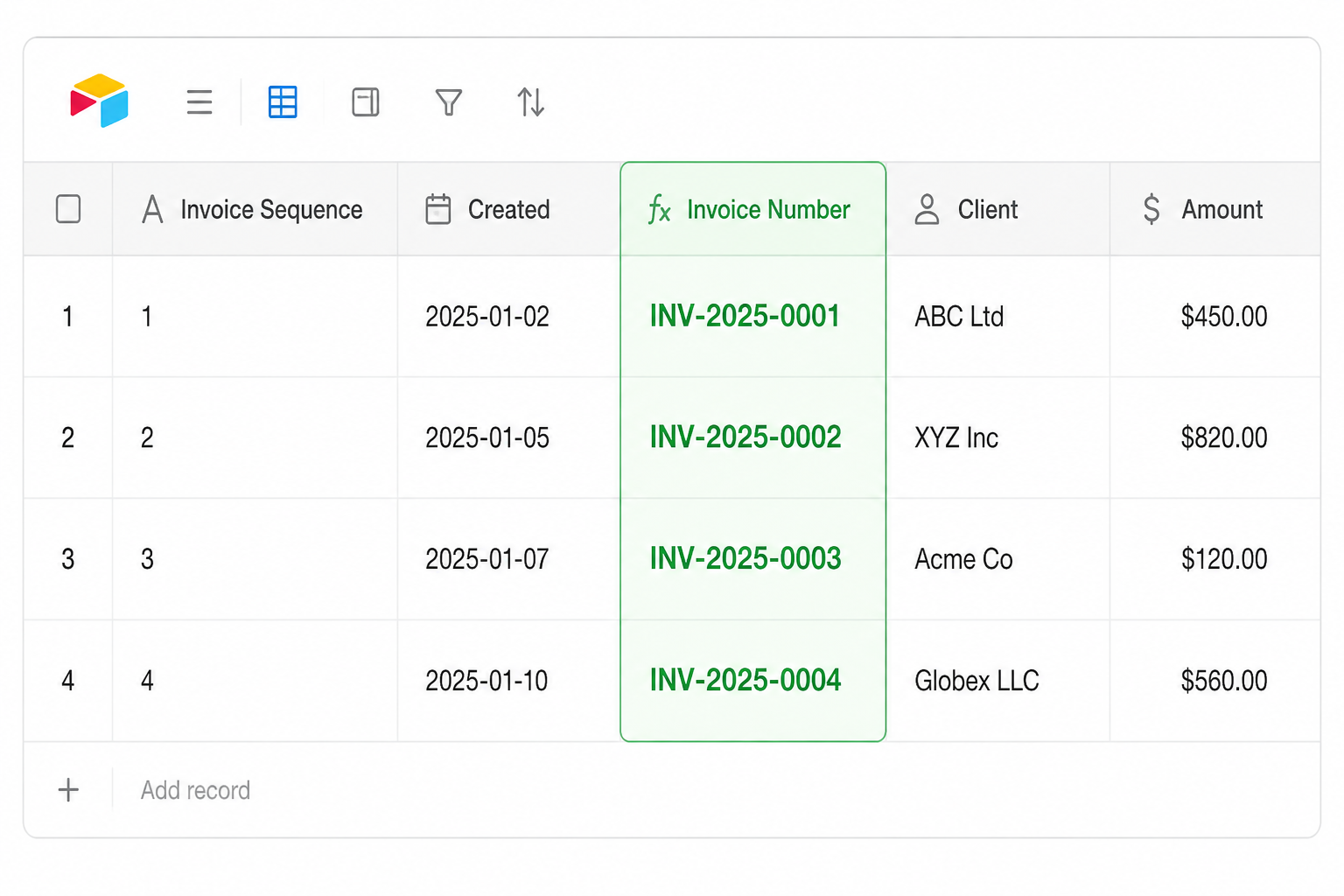
Option 1: Autonumber field for plain sequential IDs
If your accounting software generates its own invoice codes, or you just need a unique internal ID, Airtable's built-in Autonumber field is all you need. It assigns a sequential integer to each new record automatically with no configuration beyond adding the field.
This works well when the number is for internal reference only and the format does not matter.
Option 2: Formatted code using a formula
If you need a structured code like INV-2025-0042 on client invoices or for regulatory compliance, add an Autonumber field alongside a Formula field. The formula converts the raw integer into a readable invoice code.
Use a Created Time field for the year, not TODAY(). If you build the year from TODAY(), every invoice number changes as time passes. An invoice created in 2025 would read INV-2025-0042 today and silently become INV-2026-0042 once January 2026 arrives, because TODAY() recalculates every time the record is viewed. Pulling the year from when the record was actually created keeps the number permanent.
"INV-" &
DATETIME_FORMAT({Created}, "YYYY") &
"-" &
RIGHT("0000" & {Invoice Sequence}, 4)
Where Created is a Created Time field and Invoice Sequence is your Autonumber field. This produces codes like INV-2025-0001, INV-2025-0042, and INV-2025-0138.
Breaking down each part: the prefix is fixed text, DATETIME_FORMAT({Created}, "YYYY") inserts the year the record was created, and RIGHT("0000" & {Invoice Sequence}, 4) left-pads the number with zeros to four digits.
To include the month as well, extend it to:
"INV-" &
DATETIME_FORMAT({Created}, "YYYYMM") &
"-" &
RIGHT("0000" & {Invoice Sequence}, 4)
This produces codes like INV-202501-0042 for January 2025.
Once the formula field is working, you can hide the Autonumber field and display only the formatted invoice number.
A note on sequence gaps
Airtable's Autonumber field assigns the next integer when a record is created. If a record is created and then deleted, that number is consumed and never reused. Invoice 43 may follow invoice 41 if invoice 42 was deleted.
The Autonumber field also never resets on its own at the start of a new year. It keeps counting forward indefinitely, so you'll see INV-2025-0999 followed by INV-2026-1000, not a fresh INV-2026-0001. If you need yearly numbering that restarts at 0001, you'll need an automation or script to manage the reset.
Gaps in invoice sequences can be a compliance issue in some jurisdictions. If your business requires a gapless sequence, you'll need a custom automation or script that controls how invoice numbers are assigned, since Autonumber alone cannot guarantee no numbers are skipped.
Related articles
For a broader look at how automations handle number fields, see how to auto-increment and decrement number fields in Airtable using a checkbox. If you are managing multiple currencies alongside invoice numbers, managing multiple currencies in a single Airtable base covers the right field setup.