How to Manage Multiple Currencies in a Single Airtable Base
You have amounts in different currencies inside the same Airtable base.
Some are in USD, some are in EUR, and others might be in CHF.
The problem is that an Airtable currency field uses one currency symbol for the entire field. If you set a field to $, every record in that field will use $.
So how should you structure your base when you have more than one currency?
There are two simple ways to do it.
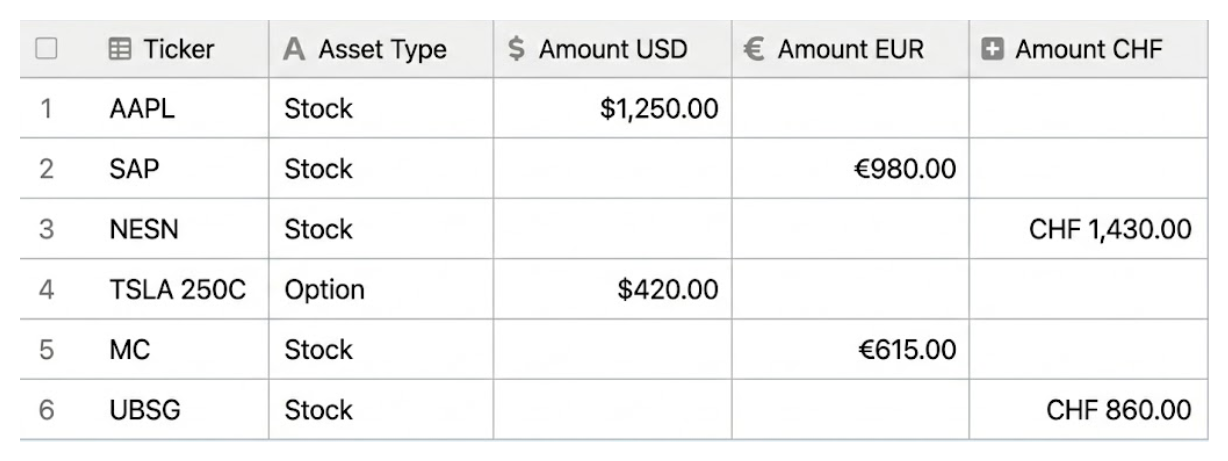
Option 1: Create a separate field for each currency
If you are keeping the currencies separate and do not need to convert them, this is the easiest setup.
Create separate currency fields:
- Amount USD
- Amount EUR
- Amount CHF
Then open the settings for each field and set the appropriate currency symbol.
For example:
Amount USD: $1,500
Amount EUR: €1,500
Amount CHF: CHF 1,500
The values remain numbers, so you can still use them in formulas, summaries, and calculations.
You do not need to concatenate a currency symbol using a formula or convert the value into text.
If your USD, EUR, and CHF amounts naturally belong in separate fields, this is all you need.
Option 2: Use Amount and Currency fields
There is another situation where separate fields do not make sense.
Imagine you have an Invoices table where every invoice has one amount.
One invoice might be:
$2,000
Another might be:
€1,500
And another might be:
CHF 3,000
Instead of creating separate amount fields for every currency, create:
Amount → Number field
Currency → Single select field
Your records would look something like this:
| Invoice | Amount | Currency |
|---|---|---|
| Invoice 001 | 2,000 | USD |
| Invoice 002 | 1,500 | EUR |
| Invoice 003 | 3,000 | CHF |
Now the amount stays numeric, and the Currency field tells you which currency it belongs to.
This works better when each record has only one amount but the currency can change from record to record.
Which one should you use?
The easiest way to decide is to look at your data.
If you need separate columns for USD, EUR, and CHF, create separate currency fields and give each one the correct symbol.
If you need one Amount field where the currency changes from record to record, use an Amount + Currency setup.
That is really the main decision.
What if you need currency conversion?
You only need to make the setup more complicated if you want to compare or total different currencies.
For example, you cannot meaningfully add:
$2,000 + €1,500 + CHF 3,000
without first converting them to the same currency.
If you need that, keep the original Amount and Currency fields and add:
- Exchange Rate
- Converted Amount
The converted amount can then be calculated in one common currency, such as USD.
You can enter the exchange rate manually or use an automation tool like Make to retrieve exchange rates automatically.
The important thing is to keep the original amount as well. If an invoice was for €1,500, that original €1,500 should stay in your base even if the exchange rate changes later.
But if you only need to store amounts in different currencies and do not need conversion, you can stop at Option 1 or Option 2.