How to Find, Remove, and Prevent Duplicate Records in Airtable
Duplicate records are one of the most common data quality problems in Airtable. They get in through form submissions, imports, manual data entry, and automations that trigger more than once. Once they are there, they throw off counts, break rollups, and cause confusion across any workflow that depends on that table being accurate.
Airtable has no built-in duplicate detection or prevention. There is no flag that says "this record already exists" and no automatic block on identical submissions.
This article covers how to find and remove duplicates that are already in your base, and how to prevent new ones from getting in.
Part 1: Finding and Removing Existing Duplicates
Option 1: Use the DeDupe Extension
The DeDupe extension is Airtable's official tool for finding and handling duplicates. It is free to install and available on all paid plans.
How to install it:
-
Open your base and click Tools in the top-right toolbar
-
Click Extensions, then Add an extension
-
Search for DeDupe and click Add
How to use it:
-
Open the DeDupe extension
-
Select the table you want to scan
-
Optionally, select a view to limit the scan to a subset of records
-
Choose the field or fields to match on. If you select multiple fields, a record is only flagged as a duplicate if all selected fields match simultaneously
For text fields, you can choose from three matching modes:
-
Exact: Only flags records with identical values. Case-sensitive. "John Smith" and "john smith" would not match.
-
Similar: Matches records with the same value but different capitalisation, punctuation, accents, or word order. "John Smith" and "john smith" would match.
-
Fuzzy: Looks for typos and character transpositions. Use carefully - fuzzy matching can produce false positives because the search is very broad.
-
-
Click Find duplicates
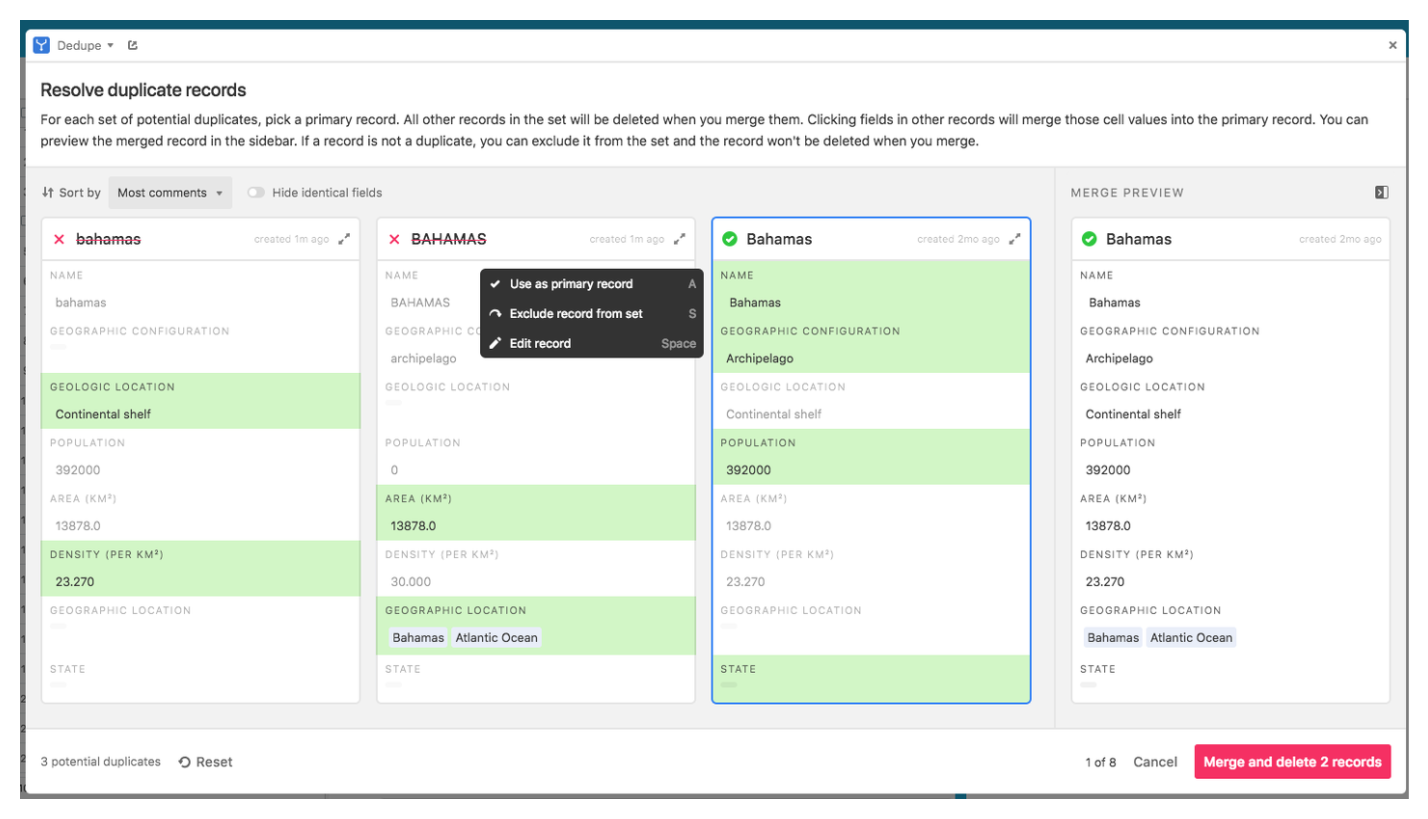
The extension groups matching records together and shows them side by side. For each group you can:
-
Choose a primary record to keep. This preserves that record's comments and revision history.
-
Merge fields from other records into the primary by clicking individual fields to highlight them in green.
-
Delete the non-primary records once you have merged what you need.
When the DeDupe extension is the right choice:
-
You need to do a one-off cleanup after a large import
-
You want to merge records rather than just delete one
-
Your table is large enough that manual review is not feasible
-
You need fuzzy or similar matching to catch near-duplicates
For a step-by-step walkthrough of the merge process specifically, see How to Merge Duplicate Records in Airtable.
Option 2: Use an Automation to Flag Duplicates on Creation
If you want to catch duplicates as they are created rather than doing periodic cleanups, you can set up an automation that checks for existing matches whenever a new record is added and flags it immediately.
How to set it up:
-
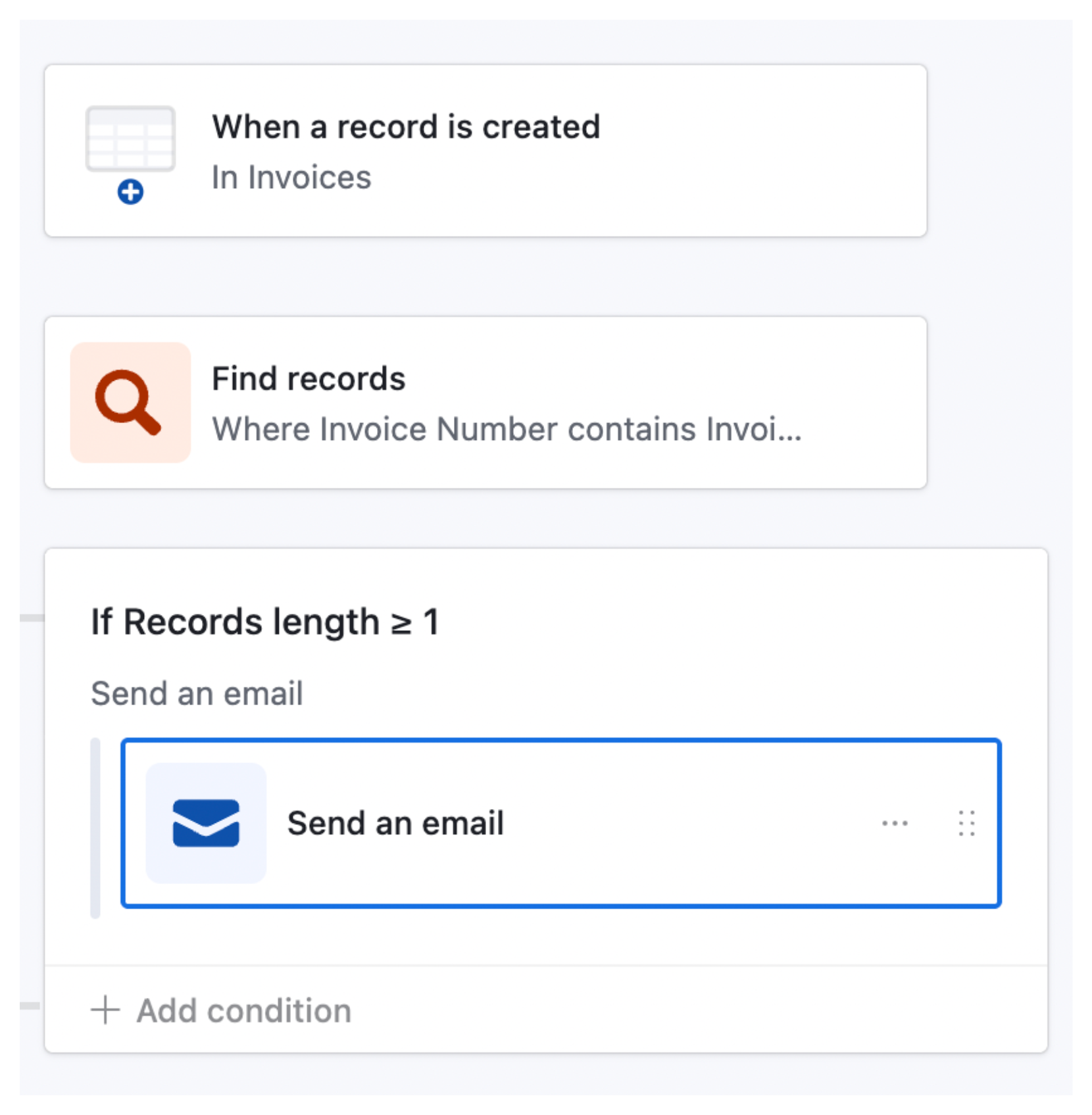
Create a new automation with the trigger When a record is created. Select the table you want to monitor.
-
Add a Find records action. Select the same table. Add a condition: the key field (such as email or name) matches the value from the newly created record. Use the field picker to reference the trigger record's value dynamically.
-
Add a Conditional logic step. Set it to check whether the Find records action returned more than 1 result.
This is an important detail: the newly created record itself will always appear in the Find records results. So if the count is exactly 1, the record is unique. If the count is more than 1, a duplicate already existed before this record was created.
-
In the branch where the count is greater than 1, add an Update record action. Update the newly created record to set a "Potential duplicate" checkbox or a status field to flag it for review. You can also add a Send email or Send a Slack message action to notify someone.
Important limitation: Airtable automations cannot delete records. The automation can flag the duplicate and send a notification, but a person still needs to review and delete it manually. If you want fully automated deletion, you need Make - see Option 3.
Option 3: Use Make for Fully Automated Duplicate Removal
For tables where duplicates need to be caught and removed automatically without any manual review, Make gives you the full workflow including deletion.
The scenario structure:
-
Trigger: Watch for new records in the Airtable table (Airtable: Watch Records module)
-
Search: Use the Airtable Search Records module to find existing records with the same value in your key field
-
Filter/Router: If the search returns more than 1 result, proceed. If exactly 1, stop - the record is unique.
-
Delete: Use the Airtable Delete a Record module to delete the duplicate
You can add additional logic - for example, always keeping the older record and deleting the newer one, or comparing created timestamps to decide which to keep.
Make has a free tier that covers low-volume use cases. For high-volume tables with frequent duplicate entries, a paid Make plan will be needed.
Part 2: Preventing Duplicates From Getting In
Cleaning up duplicates after the fact is always more work than stopping them at the source. Here are two ways to prevent them.
Prevention Method 1: Use Fillout Forms With Duplicate Prevention
Fillout is a form builder that connects directly to Airtable and has a built-in duplicate prevention feature. Before a submission is accepted, Fillout checks whether a record with the same value in a key field already exists in your Airtable table. If it does, the submission is blocked.
How to set it up:
-
In Fillout, go to the Integrate page and connect your form to Airtable
-
Under Advanced, enable the Prevent duplicates? toggle
-
Select the field to check against - for example, an email address field or a product name field
-
Publish your form
The feature currently works with email fields and single line text fields. Support for other field types is on Fillout's roadmap.
Plan requirement: Duplicate prevention is available on Fillout's Business and Enterprise plans only. It is not available on the free or Starter Fillout plans.
This is the most reliable prevention method because it stops duplicates before they ever reach your Airtable base. The submitter sees an error message and cannot complete the form if a match is found.
Prevention Method 2: Use an Automation to Flag at Entry
If you are not using a form tool and records are being added directly to Airtable by team members or via API, you can use the automation approach from Option 2 above as a near-real-time check.
The automation cannot stop the record from being created - Airtable does not support pre-creation validation. But it can flag the record within seconds and notify someone so it can be reviewed and deleted before it causes downstream problems.
Which Approach to Use
| DeDupe extension | Automation (flag) | Make (delete) | Fillout | |
|---|---|---|---|---|
| Finds existing duplicates | Yes | No | No | No |
| Prevents new duplicates | No | Partly (flags) | Yes (deletes) | Yes (blocks) |
| Handles bulk cleanup | Yes | No | No | No |
| Supports fuzzy matching | Yes | No | No | No |
| Fully automated | No | Partly | Yes | Yes |
| Free to use | Yes | Yes | Partly | No (Business+) |
For a one-off cleanup after an import, the DeDupe extension is the right tool. For ongoing flagging of new duplicates, the automation approach is the simplest. For fully automated removal without manual review, use Make. For preventing duplicates at the point of entry through a form, Fillout is the most reliable option.