5 Workarounds for Airtable iFrame Not Showing Real-Time Updates
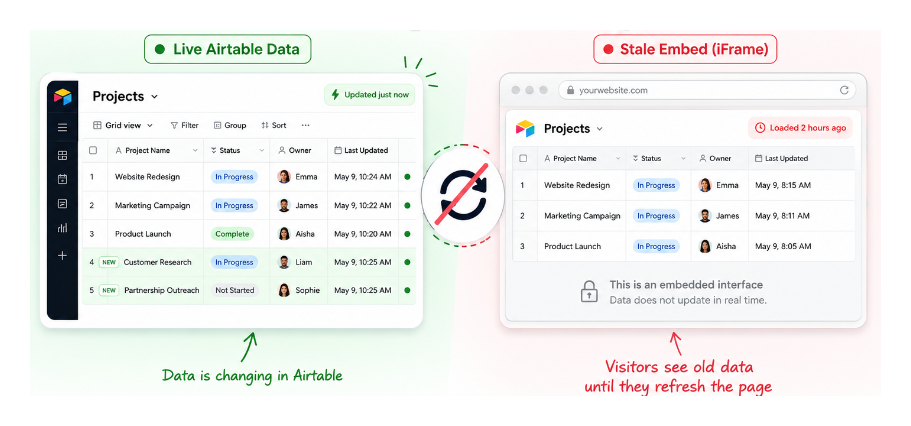
When you embed an Airtable interface on a website using an iframe, the content does not refresh when data changes in Airtable. Visitors see whatever was loaded when the page opened and need to refresh the entire page to see updates.
This is worth clarifying against standard view embeds. Embedded views do update in real time when cell values change, records are added, or field visibility is modified. The static behavior is specific to publicly shared interfaces.
If you are embedding an interface and need live data on an external site, the iframe approach is the wrong tool.
Here are five alternatives.
1. Airtable Portals
Portals give each external user a dedicated login page with access to specific interfaces. Because users are authenticated, the interface updates in real time just as it does inside Airtable itself.
Pricing starts at $120 per month for 15 portal users on the Team plan, and $150 per month on the Business plan. If you have a small, fixed set of external users who need live data access, this is the cleanest solution.
2. No-code frontend tools
Tools like Softr and Noloco connect directly to your Airtable base and render live data as a custom web app. They fetch data from Airtable's API rather than embedding a static view, so the page always reflects the current state of your base.
Both have free tiers for basic use, with paid plans starting around $29 to $49 per month depending on the tool. Pricing in this category changes frequently, so check each provider's current plans before committing. If your use case involves client portals or public-facing data displays, these tools are worth evaluating.
3. Build a custom frontend
If you have a developer available, connecting directly to Airtable's API via JavaScript and rendering the data in a custom React or Next.js frontend gives complete control over how data is fetched and displayed. The page updates on demand or on a polling interval without any of the iframe limitations.
4. WordPress plugin sync
If your site runs on WordPress, plugins like Air WP Sync pull Airtable data into WordPress on a sync schedule. For two-way sync where changes in either direction stay in sync, Whalesync handles the connection between the two.
This approach works well if your content team manages records in Airtable but the public-facing display lives in WordPress.
5. Auto-refresh browser extension
For internal dashboards where an iframe is still preferred and real-time accuracy is not critical, an auto-refresh browser extension like Auto Refresh Plus reloads the page at a set interval. This is not a proper solution since it reloads the entire page rather than syncing data, but it is adequate for situations where updates every few minutes are acceptable.
For embedding Airtable data inside other Airtable tools, see the limitations of Airtable embeds on mobile. If the underlying issue is that you want clients to view live data without full base access, how to send notifications from Airtable without base access covers the interface sharing approach.