How to Send Notifications From Airtable to Users Without Base Access
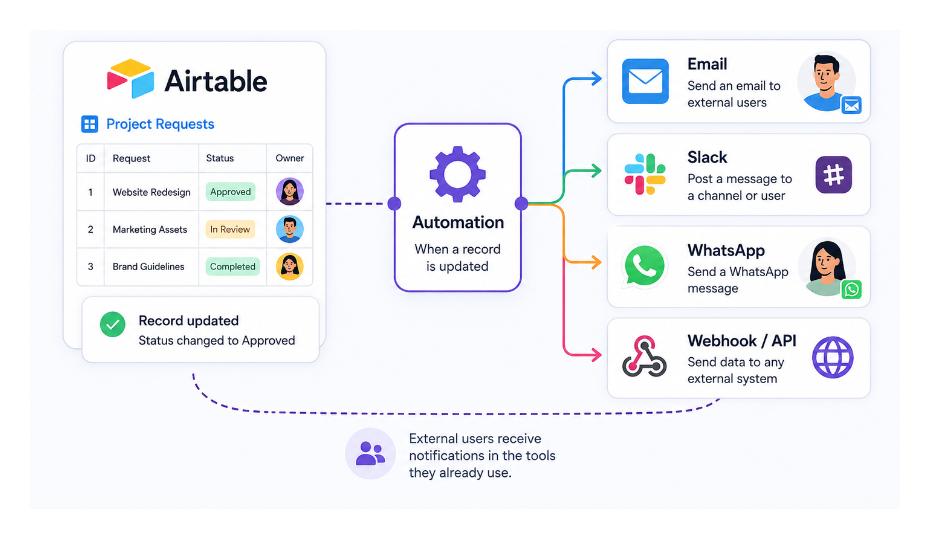
You want to notify someone when a record is updated or a task is completed, but the person does not have Airtable access. Airtable's native notification system only works for collaborators who are already in the base. Everyone else needs a different approach.
Here are the options depending on what you need to send and who you need to reach.
Why Native Notifications Do Not Work for External Users
Airtable's automation action called "Send Airtable notification" delivers an in-app notification inside Airtable. It appears in the notification bell in the top toolbar. To receive it, the person must have an Airtable account and be a collaborator on the base.
If someone is not a collaborator, you cannot use this action to reach them. There is no way to send an Airtable notification to an email address that is not linked to a collaborator account.
Approach 1: Send an Email Instead
The most straightforward solution is to use the Send email action in Airtable automations. Unlike the Airtable notification action, Send email works with any email address regardless of whether the person has an Airtable account.
Set up an automation with:
- Trigger: whatever event should prompt the notification (record updated, status changed, form submitted, scheduled time)
- Action: Send email
- Recipient: the person's email address, either hardcoded or pulled from a field on the record
You can make the email as detailed or as brief as needed. Use field tokens to pull in the record's data dynamically, so the email says "Your request for [Project Name] has been approved" rather than a generic message.
For instructions on building the email automation and making the links inside the email point to specific records or forms, see how to create dynamic hyperlinks in Airtable email automations.
Approach 2: Send a Slack Message to a Channel
If your team uses Slack and the people you want to notify are in a shared Slack workspace, the Send Slack message automation action lets you post to a channel or send a direct message.
This does not require the recipient to have an Airtable account. They only need to be in the Slack workspace. You connect your Slack account to the automation once, then configure the channel and message content.
A channel-based notification (posting to a team or project channel) works well for team-wide updates. A direct message to a specific person requires their Slack user ID, which you can hardcode in the automation or store in a field.
Approach 3: Use a Webhook to Trigger Any External System
For more complex notification needs, a Send webhook action in Airtable automations posts data to any URL you specify. From there, the receiving system can handle delivery however you need.
Common uses:
- Post to a Make webhook, which then sends an SMS via Twilio or a message via a custom channel
- Trigger a notification in a project management tool that the external user does have access to
- Send a WhatsApp message via the WhatsApp Business API
Using Make as the webhook receiver gives you access to hundreds of messaging and notification services without writing any code. The Airtable automation fires the webhook, Make picks it up and routes it to the right destination.
Approach 4: Give Them Limited Access to Receive Notifications Natively
If the person needs to receive Airtable notifications regularly and is willing to create a free Airtable account, adding them as a read-only collaborator on the base is the simplest long-term solution.
Read-only collaborators are free on all paid Airtable plans. They can receive native Airtable notifications, view records, and be tagged in comments, without being able to edit anything. See do read-only users need a paid Airtable license? for the full billing breakdown.
If they need to view the base through a cleaner interface rather than seeing the raw base, set up an Interface and give them Interface-only access. They can still receive native notifications for records they have been notified about.
Which Approach to Use
| Situation | Best approach |
|---|---|
| One-off or occasional notifications to external people | Send email automation |
| Team updates to people in your Slack workspace | Send Slack message |
| SMS, WhatsApp, or other channels | Webhook to Make |
| Regular notifications, person willing to create Airtable account | Add as read-only collaborator |